Swift’s FormatStyle and ParseableFormatStyle are the easiest way to convert Foundation data types to and from localized strings. Unfortunately Apple hasn’t done a great job in documenting just what it can do, or how to use them.
The dateTime() format style lets you compose a date string by choosing which date components you’d like to include. Each component can be further customized passing in some options.
Relative date formatting outputs a plain language string that describes how far away that date is to right now. You can also customize which date components are used in the output.
This is similar to the components format style on date ranges, but that one uses date ranges instead of assuming the current date and time.
The Verbatim Format Style is how you create a date string with any and all extra characters you might want mixed in. This is a replacement for the dateFormat strings on (NS)DateFormatter eg. “yyyy-MMM-dd”.
Use the components format style if you want a plain language representation of the distance between the earliest and latest dates in a date range. This is similar to the relative date format style (but for date ranges).
The list format style lets you take an array of data objects, and output them as a list on screen. You can also customize how each object is formatted within the list.
For Swift, it’s the easiest way to convert a data type to a fully localized display string.
Introduced with iOS 15, the FormatStyle is a Swift protocol that outlines a way to take one format and convert it to another.
On top of this, Apple built out a suite of format styles to easily convert the built in data types to strings for display with a dizzying amount of customization.
This replaces the old Formatter subclasses that were ported over from Objective-C and Apple themselves now recommends that new Swift codes uses this instead.
FormatStyle is only available when you’re writing Swift. If you’re writing Objective-C, you’ll need to use the old Formatter classes.
The only catch is that Apple has done a bad job of documenting them. Unless you know what it can do, there’s no way to discover how to do it and you’ll end up trying to re-invent the wheel.
At the core of it:
Performance
Simplicity
Performance
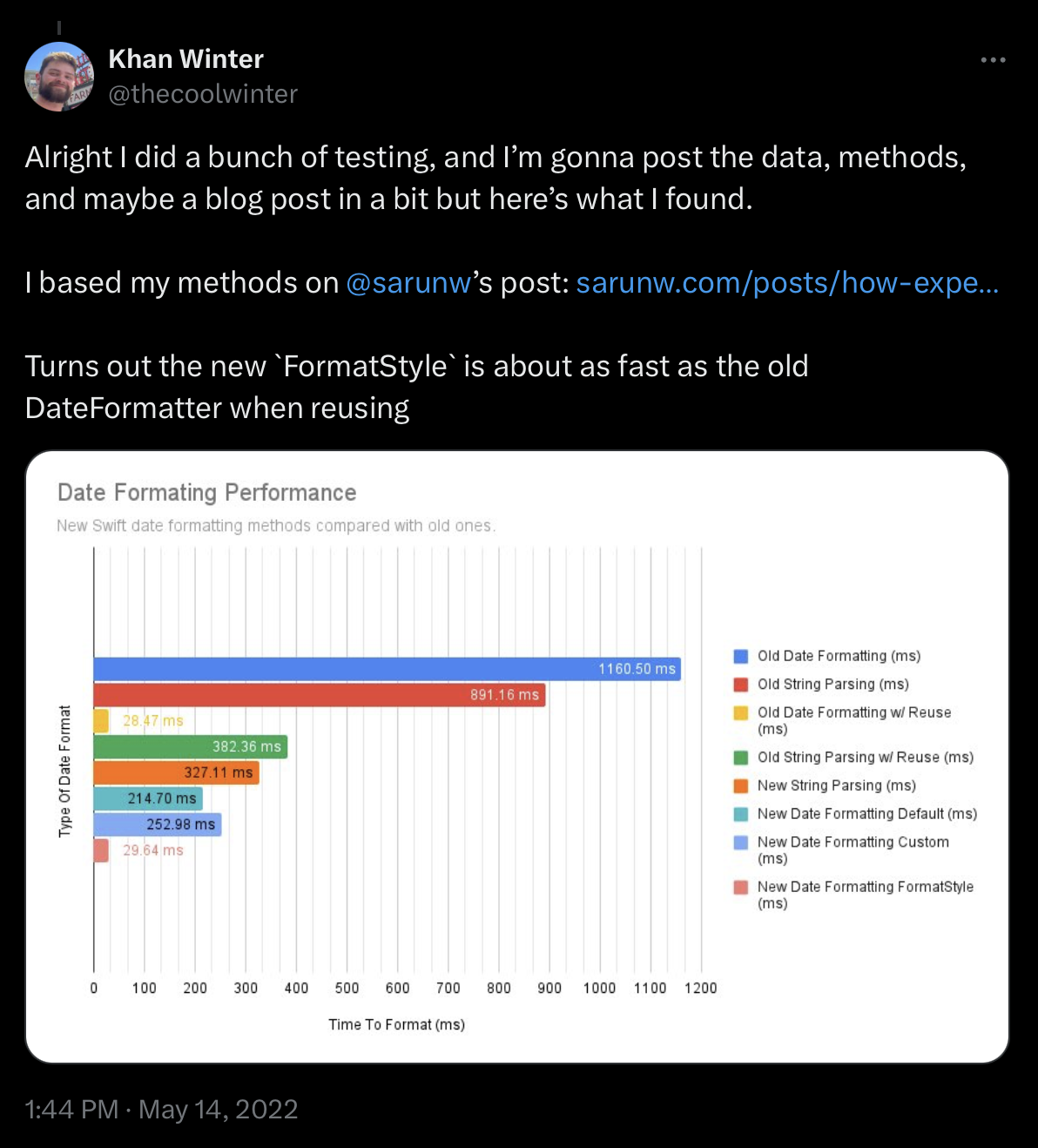
Creating an instance of a Formatter subclass is expensive and Apple’s documentation doesn’t go out of its way to tell you that. An easy trap to fall into is re-initializing a formatter every time you’d like to display some data as a string.
This isn’t too bad if you’re re-creating a formatter once per UIView, but if you make the mistake of creating a new formatter for every cell in a UICollectionView, you’re going to be in pain.
FormatStyle works like you expect it, and it handles everything behind the scenes.
Let’s say you want to display an Double as a percentage, you have to:
You create an instance of your NumberFormatter somewhere that’s reusable.
Customize the properties of the formatter to output the exact format you’d like to use.
Call the formatter’s method to output your string.
“That’s not that bad” you may think to yourself, but remember that that shiny new formatter only outputs that exact output. If you have a new output need, you have to create a new formatter.
Using FormatStyles work like you expect them, every piece of data can have their output customized and can be set up for reuse easily.
Check the sidebar/menu, you can format (and parse!) any of these types out of the box.
This badge represents a style that is available on any platform that is built by Xcode 13 and above (iOS 15.0+, iPadOS 15.0+, Mac Catalyst 15.0+, tvOS 15.0+, watchOS 8.0+, macOS 12.0+):
Number styles (including currency and percent styles)
Date styles (including iso8601, relative, and verbatim styles)
This badge represents a style that has been updated, or is only available only, on platforms built by Xcode 14 and above (iOS 16.0+, iPadOS 16.0+, Mac Catalyst 16.0+, tvOS 16.0+, watchOS 9.0+, macOS 13.0+):
This badge represents a style that is only available on platforms built by Xcode 16 and above (iOS 18.0+, iPadOS 18.0+, Mac Catalyst 18.0+, tvOS 18.0+, watchOS 11.0+, macOS 15.0+, visionOS 1.0+):
Anchored relative date style
The Basics
You can access this new system in a few ways:
Call .formatted() on a data type for a sensible, localized default
Call .formatted(_: FormatStyle) on a data type, and pass in a pre-defined or custom FormatStyle to customize your output
Call .format() on an instance of a FormatStyle
At its most basic, calling .formatted() will give you a sensible default that uses your device’s current locale and calendar to display the value.